Publishing
Publish Workflow
Following is a high level overview of the main stages in publishing an item:
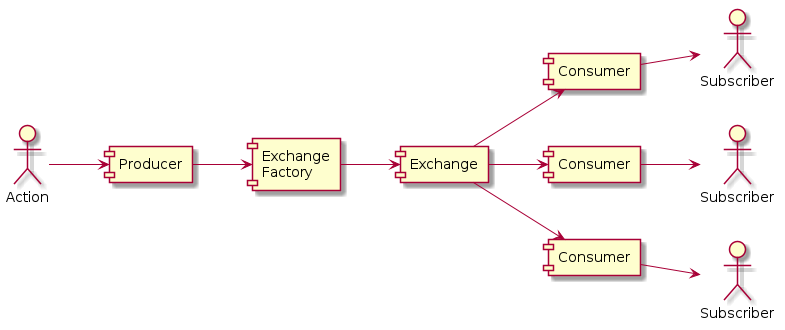
The publishing strategy used by the system can be configured in the app settings.
Common Publishing Terms:
PublishAction: The initial action that starts a request to publish an item
PublishProducer: The module that receives a PublishAction, collects data, validates it, and sends a PublishRequest to the PublishExchange
PublishRequest: Data required by the PublishExchange to process a publish action
PublishExchange: The module that receives a PublishRequest, performs filtering, formatting and routing to PublishConsumers
PublishExchangeFactory: Factory class for getting and interacting with PublishExchanges
PublishRequestResponse: The response from the PublishExchange after it receives a PublishRequest (to be used in response to a PublishAction)
PublishFormatter: Code that converts the provided item into the designated format (JSON, XML, HTML etc)
PublishTask: A single unit of work for the PublishConsumer to consume
PublishQueue: A database resource used to store PublishTasks and their current state
PublishConsumer: The module that receives a PublishTask and sends them to PublishTransmitter(s)
PublishTransmitter: The code that pushed the data to Subscriber Destinations
Subscriber/Destination: A database resource used to store configs for where to publish items to
Product: A database resource used to group ContentFilters together, for matching against items
ContentFilter: A database resource used to group FilterConditions together, for matching against items
FilterCondition: A database resource for storing the raw content filters
PublishExchangeFilter: The component of a PublishExchange that performs the subscriber filtering
PublishExchangeFormatter: The component of a PublishExchange that performs the item formatting
PublishExchangeRouter: The component of a PublishExchange that routes requests to consumers
PublishChannel: An instance of a PublishExchange, with configured filter, formatter and router
Publish Exchange Factory
The PublishExchangeFactory is the main interface used when interacting with the publishing system. It provides functionality to:
Register publish components from config
Get publish components by name
Get a PublishExchange based on a PublishRequest
Send item(s) for publishing to a PublishExchange (based on the PublishChannel config)
Process and send scheduled or pending content (from the
publishedcollection)Process pending publish queue items, sending them to a PublishExchange (based on the PublishChannel config)
The PUBLISH_EXCHANGE_FACTORY config is used to define what class to use, and defaults to
"superdesk.publish_async.exchanges:DefaultPublishExchangeFactory".
To get an instance of the publish factory, use the following function:
- get_exchange_factory() PublishExchangeFactory[source]
Gets an instance of PublishExchangeFactory.
This function retrieves a class implementation of PublishExchangeFactory from the configuration using the load_class_from_config function. It then initializes and returns an instance of the retrieved factory class.
Example publishing an item:
from superdesk.types import PublishRequest, PublishSenderType
from superdesk.publish_async import get_exchange_factory

async def publish_some_item(item: dict) -> bool:
    response = await get_exchange_factory().send(
        PublishRequest(
            item=item,
            item_id=item["_id"],
            item_type=item["type"],
            operation="publish",
            published_state="published",
            publish_to_content_api=True,
            sender_type=PublishSenderType.INGEST_RULE
        )
    )
    return response.routed
- Returns:
An instance of PublishExchangeFactory, based on the
PUBLISH_EXCHANGE_FACTORYconfig
Publish Producer
The producer’s role is to collect the information from the PublishAction, preprocess the request and construct a PublishRequest from it. This PublishRequest is then sent off to the PublishExchange for further processing.
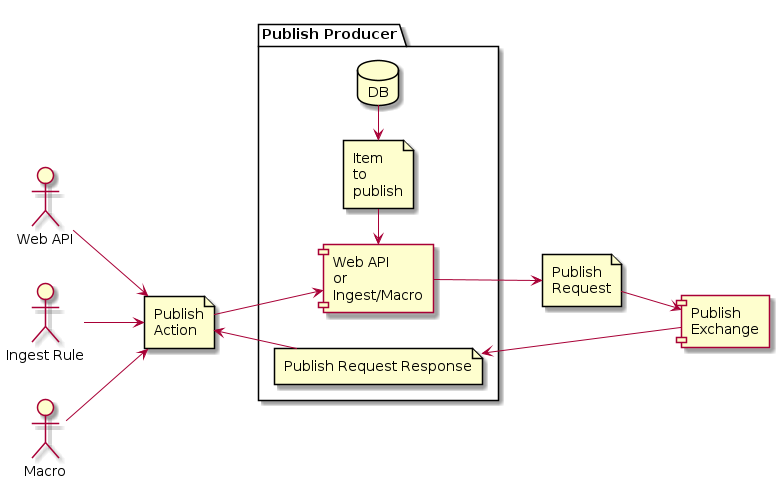
There are 2 main types of PublishProducers, Publish Actions from Web API requests and Internal Publish Actions.
Publish Actions From Web API Requests
These PublishActions come from a Web API request to publish an item. Each endpoint has it’s own PublishProducer class that handles the request:
/<api_prefix>/archive/unpublish: UnpublishService
With the exception of Resend, all inheriting from BasePublishService
- class BasePublishService[source]
Base PublishProducer used by all content publish producers, for their respective “publish” endpoint.
- Raises:
superdesk.errors.SuperdeskApiError.badRequestErrorIf the
PublishExchangefailed to route the item
superdesk.errors.InvalidStateTransitionErrorIf the current state of the item does not support this publish action
superdesk.validation.ValidationErrorIf the item has related items which are not published yet
superdesk.errors.SuperdeskApiError.badRequestErrorIf
marked_for_not_publicationis set toFalse
superdesk.errors.SuperdeskApiError.badRequestErrorIf the publish schedule value is not recognized, or it’s schedule is in the past.
superdesk.errors.SuperdeskApiError.badRequestErrorIf a publish schedule and embargo are both set.
superdesk.errors.SuperdeskApiError.badRequestErrorIf the item is an update from a previous version??? WHAT!
superdesk.errors.SuperdeskApiError.badRequestErrorIf the embargo value is invalid, or the embargo is in the past.
superdesk.errors.SuperdeskApiError.badRequestErrorIf an embargo is set and the item is a package.
superdesk.errors.SuperdeskApiError.badRequestErrorIf the item has a newer version that has been published
superdesk.errors.SuperdeskApiError.badRequestErrorIf the item has an older version that has not been published yet
superdesk.errors.SuperdeskValidationErrorIf the item fails validation based on the ContentProfile
superdesk.validation.ValidationErrorIf any associated item:
is
Killed,RecalledorSpikedis scheduled later than now
has an embargo
fails validation based on it’s ContentProfile
is currently locked
superdesk.validation.ValidationErrorIf the item is a package and:
the package is scheduled or spiked
has an embargo set
- class ArchivePublishService[source]
Handles publishing and scheduling operations for archive items.
Set’s the
_statefield topublished.- Raises:
superdesk.errors.SuperdeskApiError.badRequestErrorIf the item is package and contains no items.
- class CorrectPublishService[source]
Handles the correction and publication process for content.
Set’s the
_statefield tocorrected.- Raises:
superdesk.errors.SuperdeskApiError.badRequestErrorIf an embargo is set
superdesk.validation.ValidationErrorIf the item is a package and updated package has no items.
- class KillPublishService[source]
Handles the
Killpublish action of item(s).Set’s the
_statefield tokilled.- Raises:
superdesk.errors.SuperdeskApiError.badRequestErrorIf an embargo is set
superdesk.errors.SuperdeskApiError.badRequestErrorIf the
Datelinefield was modified
superdesk.validation.ValidationErrorIf the item is a package and updated package has no items.
- class UnpublishService[source]
Handles the
Unpublishpublish action if item(s).Set’s the
_statefield tounpublished.
- class TakeDownPublishService[source]
Handles the
Takedownpublish action if item(s).Set’s the
_statefield torecalled.- Raises:
superdesk.errors.SuperdeskApiError.badRequestErrorIf an embargo is set
superdesk.errors.SuperdeskApiError.badRequestErrorIf the
Datelinefield was modified
superdesk.validation.ValidationErrorIf the item is a package and updated package has no items.
- class ResendService[source]
Handles the
Resendpublish action of item(s).- Note:
This PublishProducer does not inherit from
apps.publish.content.common.BasePublishService.- Raises:
superdesk.errors.SuperdeskApiError.badRequestErrorIf the
PublishExchangefailed to route the item
superdesk.errors.SuperdeskApiError.badRequestErrorIf no
Subscriberswere selected, or no activeSubscriberswere selected
superdesk.errors.SuperdeskApiError.badRequestErrorIf the item has
Broadcast Scriptgenre and none of the selectedSubscribersare wire subscribers
superdesk.errors.SuperdeskApiError.badRequestErrorIf the item’s
typefield is nottextorpreformatted
superdesk.errors.SuperdeskApiError.badRequestErrorIf the item’s _state field is none of
published,corrected,being_correctedorkilled
superdesk.errors.SuperdeskApiError.badRequestErrorIf the item has a newer version than the one specified in the request
superdesk.errors.SuperdeskApiError.badRequestErrorIf the item has been updated
Internal Publish Actions
Ingest Rules:
- class DeskFetchPublishRoutingRuleHandler[source]
Ingest routing rule for fetching an item to a desk and optionally publishing it.
Macros:
- async internal_destination_auto_publish(item, **kwargs)[source]
Auto publish the item using internal destination
- Parameters:
item (dict) – item to be published
kwargs
- Raises:
StopDuplication – to indicate the superdesk.internal_destination.handle_item_published to stop duplication as duplication is handle by this method.
Validation
When publishing starts, it first validates the item based on its content profile definition or in case content profile is missing it will get validators from db. There are different validators for different content types (text, package, picture, etc) and publish type.
apps.publish.content.publish.ArchivePublishService._validate()
Note
apps.validate.validate.ValidateService() is used for item validation
After the item is validated, associated items are validated to ensure that none of them are locked, killed, spiked, or recalled.
apps.publish.content.publish.ArchivePublishService._validate_associated_items()
Items in packages are also validated if were not published before. Package is considered not valid if any of its item is not valid.
apps.publish.content.publish.ArchivePublishService._validate_package()
Schema definition
When using content profiles or validators, you specify a schema for each field like:
"headline": {
    "type": "string",
    "required": true,
    "maxlength": 140,
    "minlength": 10
}
More info about validation rules in Eve docs.
Item metadata update
When item is valid, it gets some metadata updates:
firstpublishedis set to publish_schedule datetime if scheduled or utcnowoperationis set to “publish”. Operation depends on publish types.- This value defines which enqueue service will be used to enqueue an item.
Enqueue services:
enqueue_services = {
    ITEM_PUBLISH: EnqueuePublishedService(),
    ITEM_CORRECT: EnqueueCorrectedService(),
    ITEM_KILL: EnqueueKilledService(),
    ITEM_TAKEDOWN: EnqueueKilledService(published_state=CONTENT_STATE.RECALLED),
    ITEM_UNPUBLISH: EnqueueKilledService(published_state=CONTENT_STATE.UNPUBLISHED),
}
stateis set based on action_current_versionis incrementedversion_creatoris set to current userpubstatusis set to “usable”. Pubstatus depends on publish types.expiryset item expiryword_countupdate word count
apps.publish.content.publish.ArchivePublishService.on_update()
Note
If an item has associations, those are marked as used ArchivePublishService._mark_media_item_as_used()
Publish Exchange
The “Publish Exchange” is the workhorse of the publishing system, it performs:
Filtering - Find matching Subscribers to provided item
Formatting - Format the item
Routing - Route the item to Consumers
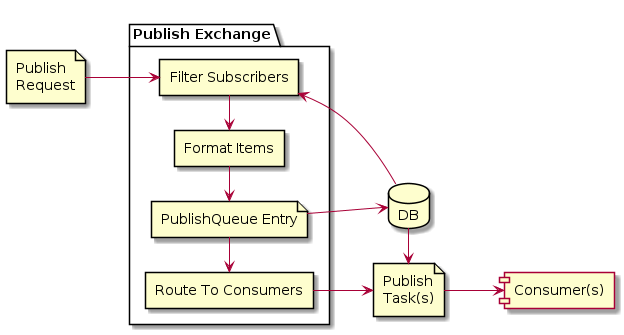
There are multiple different types of PublishExchanges, and the PublishExchangeFactory will route a PublishRequest to the appropriate PublishExchange based on certain criteria (such as ContentType, Publish Operation).
In core there are the following PublishExchanges:
The ContentPublishExchange exchange is used for publishing of content, as it knows how to handle the different
content databases, where as every other type (such as Event & Planning) will use BasicPublishExchange.
Note
This PublishExchange system allows for lots of flexibility. For example, we have the opportunity to create custom exchanges for customers which require a change in the publish workflow.
- class BasicPublishExchange[source]
BasicPublishExchange class.
This class extends PublishExchange and provides functionality for publishing content where it handles subscribers, tasks, routing, and formatting. It serves as a connecting layer to manage publish-related activities such as formatting notifications and routing tasks to appropriate consumers.
- name: str = 'default'
- async send(request: PublishRequest) PublishRequestResponse
Handles sending of publication requests to subscribers, processes tasks for routing, and manages notifications for formatted and non-formatted requests. Ensures exchange configuration is set for all tasks and performs routing. Logs an error or informational message if the publish queue target media type is not defined and no tasks are routed.
:param request:The publication request containing the details for publishing. :return:The response object that contains the result of the publication processing and routing.
- async filter_subscribers(request: PublishRequest, response: PublishRequestResponse) None
Filters subscribers based on the provided request details.
This method applies a filtering mechanism to determine suitable subscribers by utilizing the provided request and response data. It delegates the actual filtering logic to an internal filter instance, ensuring that only relevant subscribers are identified.
- Parameters:
request – The publication request containing the details for publishing.
response – The publish request response object
- async get_tasks(request: PublishRequest, response: PublishRequestResponse) tuple[list[PublishQueueResource], list[str]]
Retrieves tasks from a given request and response through an asynchronous operation.
This method uses a formatter to extract and process tasks from the provided request and response objects.
- Parameters:
request – The publication request containing the details for publishing.
response – The publish request response object
- Returns:
A tuple containing a list of PublishQueueResource objects representing the tasks and a list of strings representing additional information or results.
- async route_tasks(request: PublishRequest, response: PublishRequestResponse, tasks: list[PublishQueueResource]) None
Route tasks to appropriate consumers as defined by the routing logic of the router.
This method is responsible for handling the task distribution by delegating them to specific consumers based on the details provided in the request, response, and the intended tasks. It ensures that the tasks are routed efficiently and correctly without returning any value.
- Parameters:
request – The publication request containing the details for publishing.
response – The publish request response object
tasks – A list of tasks to be routed to the respective consumers.
- class ContentPublishExchange[source]
Class ContentPublishExchange is responsible for handling the publication of content items in a distributed system. It facilitates the management and updating of published content states, handles scheduling, and provides capabilities to route publication requests asynchronously.
This class extends BasicPublishExchange and integrates with various services and tasks for state management, error handling, and content scheduling. It ensures that the publication process is synchronized with multiple systems such as archives, notifications, and legal archives.
- name: str = 'content'
- async send(request: PublishRequest) PublishRequestResponse
Asynchronously sends a
PublishRequestto update the state of a published item. The function handles different cases for the items based on their current state or scheduled time. If the item is not found in the existing published collection, it logs a warning and returns a response indicating that it was not routed. Attempts to update or set the appropriate state (e.g., pending, queued, queued_not_transmitted) for the published item depending on circumstances and responds with the appropriate status.- Parameters:
request – The publication request containing the details for publishing.
- Returns:
The response object that contains the result of the publication processing and routing.
- Raises:
superdesk.errors.ConnectionTimeout – If there is a recoverable connection timeout error during the operation. Sets the queue state to pending and adds relevant error messages.
celery.exceptionsSoftTimeLimitExceeded – If the celery time limit is exceeded while processing the request. Sets the queue state to pending and adds relevant error messages.
Exception – For all other unexpected errors during processing. Sets the queue state to error and logs appropriate messages to help debugging.
- async get_published_item_from_request(request: PublishRequest) dict | None
Retrieve the published item associated with the given request.
This method attempts to fetch a published item from a resource service based on the ID and version in the provided request. If the item is not found using the current version, the method makes a secondary attempt to locate it using the ‘last_published_version’. If the item cannot be retrieved on either attempt, None is returned, and appropriate warnings are logged.
- Parameters:
request – The request containing the item ID and version details needed to retrieve the published item.
- Returns:
The retrieved published item if found, otherwise
None.
- async set_published_item_pending(item_id: ObjectId) None
Marks a published item as pending by updating its queue state and the timestamp of the last queue event in the database. The operation is executed asynchronously.
- Parameters:
item_id – The ID of the published item to be updated.
- async update_published_item(item_id: ObjectId)
Updates the publish state of an item to indicate it is in progress.
This function updates the state of a specific item in the published database to mark it as being published. The last_queue_event field is updated to the current UTC timestamp to reflect when the transition occurred. It utilizes the get_resource_service to update the targeted item.
- Parameters:
item_id – The ID of the published item to be updated.
- async updated_scheduled_item(published_item: dict)
Updates a scheduled item to published state, modifies its version and related metadata in archive and published collections, sends notifications, and triggers related operations.
- Parameters:
published_item – Dictionary representing the information of the scheduled item to update, including item ID, state, and versioning details.
Notes
Modifies the state of the item from scheduled to published.
Updates version metadata in the archive and published collections.
Inserts the modified item version into the appropriate version records.
Updates the archive item’s history and triggers auxiliary operations like import into legal archive and sending content notifications.
This function triggers signals for item publication and sends queue events for clients to process further.
Logging is performed to provide operation updates and trace activities.
- publish_package(request: PublishRequest, target_subscribers: dict[ObjectId, SubscriberPackageItems]) PublishRequestResponse | None
Publishes a given package to given subscribers.
For each subscriber updates the package definition with the wanted_items for that subscriber and removes unwanted_items that doesn’t supposed to go that subscriber. Text stories are replaced by the digital versions.
- Parameters:
request – The publication request containing the details for publishing.
target_subscribers – Dictionary of Subscriber ID and items-per-subscriber
- Returns:
PublishRequestResponse if the request was handled, else
None.
Publish Exchange Filter
The PublishExchangeFilter’s role is to match the incoming item against Products to find the Subscribers to send the item to.
Available PublishExchangeFilters:
“default” –
BasePublishExchangeFilter“content” –
ContentPublishExchangeFilter“content:corrected” –
CorrectedPublishExchangeFilter“content:killed” –
KilledPublishExchangeFilter“resend” –
ResendPublishExchangeFilter
- class BasePublishExchangeFilter[source]
BasePublishExchangeFilter is responsible for filtering subscribers, matching content to subscribers’ configurations, and processing the details for content-targeted publishing.
The class extends PublishExchangeFilter and provides functionality to apply global and specific filters on subscribers, process products, and manage the association of matched products with subscribers. It determines the subscribers for a publish request based on filtering criteria such as subscriber types, targets, global content filters, and product characteristics.
- name: str = 'default'
- async filter_subscribers(request: PublishRequest, response: PublishRequestResponse) None
Filters subscribers based on the given publish request. This method updates the global filter matches, retrieves subscribers fulfilling the criteria, processes the products for these subscribers, and handles individual subscriber actions. If no subscribers are found for the request, a warning is logged.
- Parameters:
request – The PublishRequest instance with details for filtering subscribers and products.
response – The PublishRequestResponse instance for collecting the filtering results.
- async get_subscribers(request: PublishRequest) list[SubscribersResource]
Retrieve matching subscribers for a given publish request.
This method filters cached subscribers based on the criteria defined in the helper methods subscriber_type_matches_request_type and subscriber_target_matches_item_target. It retrieves the subscribers from a cached instance of PublishCache and applies the filtering logic to return a list of relevant subscribers for the publish request.
- Parameters:
request – The PublishRequest instance with details for filtering subscribers and products.
- Returns:
A list of Subscribers to use for checking against this publish request.
- process_products(request: PublishRequest, response: PublishRequestResponse, subscribers: list[SubscribersResource]) None
Processes products and Content API products based on the provided request and the list of subscribers.
This method determines the set of product IDs and API product IDs from the given subscribers, matches them to the request, and populates the response with the matched products, matched API products, and their corresponding product codes.
- Parameters:
request – The PublishRequest instance with details for filtering subscribers and products.
response – The response object to hold matched products, API products, and their product codes.
subscribers – A list of subscriber resources contributing to the product and API product IDs.
- process_subscriber(request: PublishRequest, response: PublishRequestResponse, subscriber: SubscribersResource) None
Processes a subscriber and determines their inclusion in the response based on specified conditions. The function evaluates the subscriber’s products and API products, checking for matches to include them in the response. Additionally, targeted subscribers are considered for inclusion even if they do not match product criteria.
- Parameters:
request – The PublishRequest instance with details for filtering subscribers and products.
response – The response object to hold matched products, API products, and their product codes.
subscriber – The subscriber being evaluated for inclusion in the response.
- get_matched_subscriber_products_codes(response: PublishRequestResponse, product_ids: list[ObjectId], use_api_products: bool = False) tuple[bool, set[str]]
Gets the matched subscriber products codes based on the response and a list of product IDs. Optionally, it determines whether to use the Content API products or the matched products from the response.
- Parameters:
response – The response containing matched products and product codes mappings.
product_ids – A list of product IDs to filter the matched products.
use_api_products – If set to
True, uses the matched Content API products instead of the default matched products from the response. Default isFalse.
- Returns:
The first element indicates whether matched product codes exist, and the second is a set of matched product codes.
- subscriber_type_matches_request_type(request: PublishRequest, subscriber: SubscribersResource) bool
Determines whether the subscriber’s type is compatible with the request’s target media type and item type.
The function checks the compatibility of a request’s target media type and item type with the subscriber’s type. It ensures that subscribers receive appropriate content types according to their subscription type. For example, a WIRE subscriber may only receive text or preformatted content.
- Parameters:
request – A request containing the target media type and item type to be matched against the subscriber’s type.
subscriber – The subscriber’s resource, which includes subscription type indicating the allowed content types.
- Returns:
Trueif the subscriber’s type matches the request type,Falseotherwise.
- subscriber_target_matches_item_target(request: PublishRequest, subscriber: SubscribersResource) bool
Determines if a subscriber matches the targeting parameters defined in the item’s targets.
The method evaluates if the given subscriber conforms to the targeting conditions specified in the item’s “target_subscribers”, “target_types”, and “target_regions”. It checks the subscriber’s identifier, type compatibility, and other targeting rules allowing for a match.
- Parameters:
request – The request containing the item’s targeting data.
subscriber – The subscriber resource to evaluate against the targets.
- Returns:
Trueif the subscriber matches the targeting constraints, otherwiseFalse.
- subscriber_is_targeted(request: PublishRequest, subscriber: SubscribersResource) bool
Determines if the subscriber is targeted based on the requested item’s target subscribers. Iterates through the target_subscribers list within the provided PublishRequest and checks if the subscriber.id matches any of the targeted subscriber IDs.
- Parameters:
request – The PublishRequest object containing the item and the target
subscriber – The Subscriber object to verify against the target subscribers.
- Returns:
Trueif the subscriber is targeted, otherwiseFalse.
- subscriber_matches_global_filter(subscriber: SubscribersResource) bool
Determines if a subscriber matches the global content filter criteria.
This function evaluates whether a given subscriber aligns with the global content filters by leveraging cached data. If any global content filter disqualifies the subscriber, the function will return
False.- Parameters:
subscriber – The subscriber object to be evaluated against the global content filters.
- Returns:
Trueif the subscriber matches the criteria of the global content filters, otherwiseFalse.
- product_target_matches_item_target(request: PublishRequest, product: ProductsResource) bool
Determines if the target regions of a product match the target regions of an item.
This function evaluates the geo-restrictions associated with a product and an item’s target regions to determine if they are consistent. It checks whether the product’s geo-restriction aligns with the “allow” or “disallow” state of target regions defined in the item.
- Parameters:
request – The request containing the item with its target regions.
product – The product containing geo-restriction information.
- Returns:
Trueif the product’s geo-restrictions match the target regions of the item;Falseotherwise.
- content_filter_matches_item(request: PublishRequest, content_filter: ContentFiltersResource | None) bool
Determines whether a content filter matches a specific item based on the given request. The function either uses a cached result or computes the match if no cached value is present.
This method first checks if a content filter is provided. If not, it assumes all content filters match the item. Otherwise, it retrieves a cached result or evaluates the match using the given content filter and stores the result in the cache for future requests.
- Parameters:
request – The PublishRequest object containing the item to be evaluated.
content_filter – The content filter to be matched against the item. If None, all content filters are treated as matching.
- Returns:
Trueif the content filter matches the item,Falseotherwise.
- filter_condition_matches_item(request: PublishRequest, content_filter: ContentFiltersResource, filter_condition_ids: list[ObjectId]) bool
Determines whether all specified filter conditions match the given item in the publish request.
This method evaluates a list of filter conditions against a provided item from the request. It utilizes a caching mechanism to avoid redundant processing of the filter conditions that have already been evaluated for the same request item. The method returns
Trueonly if all specified filter conditions match the item. If any filter condition fails to match, the method immediately returnsFalse.- Parameters:
request – The publish request containing the item to check against the filter conditions.
content_filter – The content filter resource that contains filter conditions to evaluate.
filter_condition_ids – A list of unique identifiers corresponding to the filter conditions to be checked.
- Returns:
Trueif all specified filter conditions match the item in the request. Otherwise, returnsFalse.
- content_filter_ids_matches_item(request: PublishRequest, content_filter_ids: list[ObjectId]) bool
Determines if a given request’s item matches all provided content filter IDs.
This method evaluates a set of content filter IDs against an item’s PublishRequest. It utilizes a caching mechanism to store and retrieve content filter match results, thus reducing redundant computations. A content filter mismatch for any single ID results in a
Falsereturn immediately. All content filters must returnTruefor the method to confirm a match.- Parameters:
request – The request object containing the item to be evaluated.
content_filter_ids – A list of content filter identifiers to check against the given item.
- Returns:
Trueif all provided content filter IDs match the item, otherwiseFalse.
- product_filter_matches_item(request: PublishRequest, product: ProductsResource) bool
Determines whether a product filter matches an item based on the request and product’s content filter.
This method evaluates the given product’s content filter against the provided request to determine if the filter matches. The outcome depends on the type of the product’s content filter and the match result. If the filter is not specified or lacks a valid filter ID, it is considered a match.
- Parameters:
request – The request object used for evaluating the content filter.
product – The resource representing the product, which includes content filter information.
- Returns:
Trueif there’s no filterTrueif matches and permittingFalseif matches and blockingFalseif doesn’t match and permittingTrueif doesn’t match and blocking
- get_matching_products(request: PublishRequest, product_ids: set[ObjectId]) list[ProductsResource]
Fetches and returns a list of product resources that match the given request criteria from the specified set of product IDs. The matching operation utilizes a predefined cache to optimize performance and avoid redundant computations.
- Parameters:
request – The request object containing the criteria to match products against.
product_ids – A set containing product IDs to be checked for matching.
- Returns:
A list of product resources that match the request criteria. Returns an empty list if no product_ids are provided or no matches are found.
- product_matches_item(request: PublishRequest, product: ProductsResource) bool
Determines if a product matches specific criteria in the request.
This method checks whether the product’s targeting matches the item targeting and if the product’s filter matches the item according to the given request and product resource.
- Parameters:
request – Contains details of the publishing request such as targeting and filter data.
product – Represents the resource of the product, providing necessary information for matching against request details.
- Returns:
Trueif the product matches the targeting and filter criteria specified in the request, otherwiseFalse.
- cache_global_filter_matches(request: PublishRequest)
Caches the global filter matches for a given publish request. This method processes the global filters stored in the PublishCache, evaluates matches based on content filters, and stores the results in the cache for efficient reuse.
- Parameters:
request – The request object containing the necessary information to evaluate content filter matches for global filters.
- class ContentPublishExchangeFilter[source]
ContentPublishExchangeFilter is a class responsible for managing the filtering of subscribers during the content publishing or updating process. It implements mechanisms to handle both original and rewritten content items, ensuring that the appropriate subscribers are targeted based on content status and associations.
This class is utilized as part of a content publishing pipeline to determine which subscribers should be updated or notified about content changes. It handles relationships between content items, filtering subscribers based on associated content when necessary, and ensures deduplication of subscribers during rewrites.
- name: str = 'content'
- async filter_subscribers(request: PublishRequest, response: PublishRequestResponse) None
Filters and processes subscribers based on the status of the item within the request. If the item is a rewrite of an existing item, it is processed differently compared to an original item. Modifies the response accordingly.
- Parameters:
request – The request object containing details about the item to be processed.
response – The response object to be populated with the processed result.
- class CorrectedPublishExchangeFilter[source]
CorrectedPublishExchangeFilter class handles filtering subscribers for article corrections.
This class is a specialized filter for handling articles marked as corrected. Its primary role is to determine which subscribers need to receive the corrected article version based on their previous subscriptions and various filtering criteria. The process includes checking the article’s target media type, excluding certain subscribers based on conditions like ‘targeted_for’ property, and applying publish and global filters.
- name: str = 'content:corrected'
- async filter_subscribers(request: PublishRequest, response: PublishRequestResponse) None
Filters the subscribers for the given document based on the specified target_media_type for an article correction. This involves identifying eligible subscribers who have either previously received the document or are part of the active subscribers list, and applying additional filtration based on specific criteria.
The filtration process is as follows:
Identify subscribers (digital and wire) who previously received the article.
Fetch the list of active subscribers and exclude those who have already received the article in the past.
If the article has the property ‘targeted_for’ (e.g., “target_regions”), exclude subscribers of type “Internet” from the active subscribers list.
Further filter the remaining active subscribers by applying publish filters and global filters specific to this document.
- Parameters:
request – PublishRequest object containing information about the document to correct, including its metadata, target media type, and the current state.
response – PublishRequestResponse object that will be populated with the final list of filtered subscribers, along with associated product codes and their associations.
- Returns:
None. The filtered subscriber list, along with their product codes and associations, is set in the response object. - response.subscribers: A list of filtered subscriber objects. - response.subscriber_codes: A dictionary mapping subscribers to their product codes. - response.associations: A dictionary of associations for each subscriber.
- class KilledPublishExchangeFilter[source]
KilledPublishExchangeFilter processes publication requests by filtering subscribers based on the target media type and the document’s state. It ensures that a kill operation is sent to subscribers who have previously received the document, either in its published or corrected state.
This class is derived from ContentPublishExchangeFilter and provides additional filtering logic specific to handling “killed” publications. It is primarily used for managing unpublishing actions to the correct set of subscribers.
- name: str = 'content:killed'
- async filter_subscribers(request: PublishRequest, response: PublishRequestResponse) None
Filters subscribers to receive a “kill” operation for a document.
This method determines the subscribers to notify when a document is “killed”. It targets all subscribers who previously received the document in its “published” or “corrected” states. If no prior subscribers are found, the method may optionally re-filter based on configuration.
- Parameters:
request – PublishRequest object containing information about the document to correct, including its metadata, target media type, and the current state.
response – PublishRequestResponse object that will be populated with the final list of filtered subscribers, along with associated product codes and their associations.
- Returns:
None. The filtered subscriber list, along with their product codes and associations, is set in the response object. - response.subscribers: A list of filtered subscriber objects. - response.subscriber_codes: A dictionary mapping subscribers to their product codes. - response.associations: A dictionary of associations for each subscriber.
- class ResendPublishExchangeFilter[source]
Represents a filter that determines subscriber and product eligibility for resend operations in a publish-subscribe system.
This filter is specialized for resend operations and bypasses certain checks that are typically enforced in other types of operations. It ensures that the appropriate subscribers and products are selected for publication without validating specific attributes like type or target during the resend process.
- name: str = 'resend'
- async get_subscribers(request: PublishRequest) list[SubscribersResource]
Returns the list of subscribers provided in the publish request.
- Parameters:
request – The publish request containing the subscribers information.
- Returns:
The list of subscribers extracted from the publish request, or an empty list if none are available.
- subscriber_type_matches_request_type(request: PublishRequest, subscriber: SubscribersResource) bool
When resending an article, skip checking subscriber type against request type.
- Parameters:
request – The publish request containing the subscriber type.
subscriber – The subscriber resource containing the subscriber type.
- Returns:
True
- subscriber_target_matches_item_target(request: PublishRequest, subscriber: SubscribersResource) bool
When resending an article, skip checking subscriber target against item target.
- Parameters:
request – The publish request containing the subscriber type.
subscriber – The subscriber resource containing the subscriber type.
- Returns:
True
- cache_global_filter_matches(request: PublishRequest)
When resending an article, skip checking global filters.
- Parameters:
request – The publish request containing the subscriber type.
- subscriber_matches_global_filter(subscriber: SubscribersResource) bool
When resending an article, skip checking subscriber against global filter.
- Parameters:
subscriber – The subscriber resource containing the product details.
- Returns:
True
- product_matches_item(request: PublishRequest, product: ProductsResource) bool
When resending an article, skip checking Product matches item.
- Parameters:
request – The publish request containing the subscriber type.
product – The product resource containing the product details.
- Returns:
True
Publish Exchange Formatter
The PublishExchangeFormatter’s role is to convert the incoming request to PublishQueue entries. It does this by iterating over the matched Subscribers, and their destinations, and converts the item using the configured Output Formatters for each destination. The PublishQueue entries are then created and added into the database for use by PublishConsumers.
- class BasePublishExchangeFormatter[source]
Handles the formatting and processing of publish requests and responses.
The class is designed to interact with the publishing pipeline, providing functionality to process subscribers, destinations, and formatting of items to be published. It enables the generation of tasks for publishing queue resources and handles specific requirements such as embedding package items or filtering document fields based on profiles.
- name: str = 'default'
- async get_request_tasks(request: PublishRequest, response: PublishRequestResponse) tuple[list[PublishQueueResource], list[str]]
Retrieves tasks for publishing an item to subscribers and handles formatting issues.
This asynchronous method generates a list of tasks required for publishing an item to the subscribers specified in the response. It processes formatting-specific issues encountered for certain subscribers and logs the details of the exceptions if they occur during task generation. Tasks and no-formatters are collected and returned from this method.
- Parameters:
request – An instance of PublishRequest containing details about the item to be published and other request metadata.
response – An instance of PublishRequestResponse that contains subscriber details and other response metadata.
- Returns:
A tuple where the first element is a list of PublishQueueResource representing publishing tasks for the subscribers, and the second element is a list of strings representing subscribers that have formatting issues.
- async get_tasks_for_subscriber(request: PublishRequest, item: dict, subscriber: SubscribersResource, response: PublishRequestResponse, task_cache: dict[str, list[PublishQueueResource]])
Retrieves publishing tasks for the provided subscriber and their destinations.
This asynchronous function processes a set of subscriber destinations to gather the publishing tasks to be performed. Tasks are generated based on the subscriber’s destination configurations and the supplied item details. Unsupported formats are recorded separately.
- Parameters:
request – The publishing request containing global context and configuration
item – A dictionary representing the item being published. Contains details necessary for formatting and packaging.
subscriber – The subscriber resource containing information about the subscriber
response – A response object that holds contextual data for the publishing request,
task_cache – A cache of previously processed tasks, mapped by task type.
- Returns:
A tuple consisting of: - list[PublishQueueResource]: A list of publish queue resources representing the tasks to be performed for the provided subscriber. - list[str]: A list of formats for which a formatter was not found.
- async get_tasks_for_destination(request: PublishRequest, item: dict, subscriber: SubscribersResource, response: PublishRequestResponse, formatter: Formatter, embed_package_items: bool, destination: SubscriberDestination, task_cache: dict[str, list[PublishQueueResource]]) list[PublishQueueResource]
Generate a list of publish queue resources for a given subscriber destination.
This asynchronous method handles generating publish queue tasks based on the data provided, utilizing caching when possible. It formats the subscriber’s data and publishes it, creating and returning publish queue resources for further use. The result depends on various factors including caching policies, subscriber details, and the destination type.
- Parameters:
request – The primary publish request containing item identification and requesting state details.
item – The dictionary containing item details to be formatted and added to the publish queue.
subscriber – Resource object representing the subscriber’s details.
response – The publish response object including data like subscriber codes and associations.
formatter – The formatter instance to format the item’s details based on required rules.
embed_package_items – Flag indicating whether to embed the package items or not.
destination – The final destination configurations for publishing.
task_cache – A dictionary-structured cache for tasks, indexed by cache id.
- Returns:
A list of publish queue resources representing the generated tasks for processing.
- Raises:
RuntimeError – Raised if the formatter returns an unexpected response.
- filter_item_fields(item: dict) dict
Filter fields of an item dictionary based on its profile and remove unwanted nested data.
The method takes in an item dictionary, determines its profile using an external cache, and applies a schema to it. It also removes any rendition entries that have a value of None from the nested associations within the dictionary. This ensures the item conforms to its expected structure based on the given profile.
- Parameters:
item – The item dictionary to be filtered and updated.
- Returns:
The filtered and updated item dictionary.
- get_subscriber_destinations(request: PublishRequest, subscriber: SubscribersResource, content_api_enabled: bool) list[SubscriberDestination]
Extracts and aggregates the destinations for a specific subscriber based on the given parameters.
This method combines the subscriber’s current list of destinations and appends an additional destination if content API publishing is enabled and allowed by the parameters. It respects optional attributes and handles cases where attributes may be absent safely.
- Parameters:
request – The request object containing publishing preferences.
subscriber – The resource representing the subscriber with associated destinations.
content_api_enabled – A flag indicating whether publishing to content API is active.
- Returns:
A list of destination objects, which includes the subscriber’s current destinations and, optionally, the content API destination.
Output Formatters
Available core formatters:
- class NINJSFormatter[source]
The schema we use for the ninjs format is an extension of the standard ninjs schema.
Changes from ninjs schema:
uriwas replaced byguid:urishould be the resource identifier on the webbut since the item was not published yet it can’t be determined at this point
added
priorityfieldadded
servicefieldadded
sluglinefieldadded
keywordsfieldadded
evolvedfromfieldadded
sourcefield
Associations dictionary may contain entire items like in ninjs example or just the item
guidandtype. In the latest case the items are sent separately before the package item.
Superdesk NINJS Schema in JSON.
- class NINJS2Formatter[source]
NINJS formatter v2
Added in version 2.0.
Extending
NINJSFormatterto avoid breaking changes.Changes:
user
correction_sequenceforversionfield, so it’s 1, 2, 3, … in the outputadd
rewrite_sequencefieldadd
rewrite_offield
- class EmailFormatter[source]
Superdesk Email formatter.
Feature media renditions are passed on to the transmit service, which if configured will attach the media to the email.
It uses templates to render items, those can be overriden to customize the output:
email_article_subject.txtemail subject
email_article_body.txtemail text content
email_article_body.htmlemail html content
It gets
articlewith item data, can be used in templates like:<strong>{{ article.headline }}</strong>
Publish Exchange Router
The PublishExchangeRouter’s role is to route the PublishTasks/PublishQueue entries to the correct PublishConsumer, based on the Subscriber config. Tasks will be grouped by it’s Subscriber, so the consumer can process all incoming requests per Subscriber.
The router will use the get_exchange_factory().get_subscriber_consumer(subscriber) method from the PublishExchangeFactory
to get the correct Consumer based on the PublishTask’s Subscriber.
The PublishConsumer used will be:
Asyncio Publish Consumer: If the Subscriber has the async flag turned on
Content API Consumer: If the Subscriber destination is the ContentAPI
Celery Publish Consumer: Otherwise the celery consumer will be used
Note
Currently the routing is very basic, and has lots of room for improvement. It will allow us to add more configuration options on a Subscriber and/or Destination to help determine the Consumer to use. It is also possible that custom consumers can be created for customers which changes how the consumer works.
- class AsyncioPublishRouter[source]
Handles asynchronous routing of publishing tasks to the appropriate consumers.
The AsyncioPublishRouter is responsible for taking publishing tasks, grouping them by their intended subscribers, and dispatching them asynchronously to the appropriate consumers. This class utilizes asyncio to facilitate concurrent processing of tasks and ensures efficient handling of the routing process. It integrates with underlying subscriber and consumer components to execute the routing logic.
- name: str = 'asyncio'
- async route_tasks_to_consumers(request: PublishRequest, response: PublishRequestResponse, tasks: list[PublishQueueResource]) None
Route the tasks to the appropriate consumers.
Asynchronously routes a list of publish tasks to corresponding subscribers via their respective PublishConsumer(s). This function first initializes the PublishCache, groups tasks by their subscriber, and sends them to the appropriate consumer. It keeps track of the success or failure of these tasks and updates the response object accordingly.
- Parameters:
request – The request object containing data necessary for routing tasks.
response – The response object to be updated with the routing outcome.
tasks – A list of tasks to be routed to the respective consumers.
- group_tasks_by_subscriber(request: PublishRequest, tasks: list[PublishQueueResource]) list[tuple[SubscribersResource, list[PublishQueueResource]]]
Groups tasks by their associated subscriber and consumer.
This function processes a list of tasks, associates them with their respective subscribers and consumers from the cache, and returns the result as a list of tuples. Each tuple consists of a subscriber resource and a list of associated tasks. If a task is designated for the content API, it is grouped separately and handled as a single unit for all subscribers.
- Parameters:
request – The publish request which contains the item and additional information relevant for the task and subscriber grouping process.
tasks – A list of tasks to be grouped by their associated subscribers.
- Returns:
A list of tuples. Each tuple contains a subscriber resource and a list of tasks associated with that subscriber.
- async send_tasks_to_consumer(subscriber: SubscribersResource, tasks: list[PublishQueueResource]) None
This method sends a list of tasks to the specified consumer for processing. It utilizes the subscriber to fetch the appropriate consumer instance and delegates task processing to the consumer. In case of an error during processing, the method logs the exception.
- Parameters:
subscriber – The subscriber resource used to fetch the consumer.
tasks – A list of tasks to be processed.
- class CeleryPublishRouter[source]
Handles the routing of tasks to a consumer using Celery.
The CeleryPublishRouter class is designed to work as a publish router specifically for integrating with the Celery task distribution system. This class leverages an asynchronous approach for sending tasks to a consumer via Celery. It inherits functionality from AsyncioPublishRouter and specializes it for Celery-related use cases.
- name: str = 'celery'
- async send_tasks_to_consumer(subscriber: SubscribersResource, tasks: list[PublishQueueResource]) None
Send multiple tasks to a consumer based on a given subscriber.
This asynchronous function retrieves a consumer associated with the provided subscriber and enqueues tasks to be sent to that consumer. The tasks are defined as a list of PublishQueueResource instances. Each task’s identifier is sent to the consumer for processing.
- Parameters:
subscriber – The subscriber resource associated with the consumer.
tasks – A list of task instances to be sent to the consumer.
Publish Consumer
The PublishConsumer’s role is to receive PublishTask(s) for a single Subscriber, and transmit them to each Destination within that Subscriber. The Content Transmitters are used to send the items.
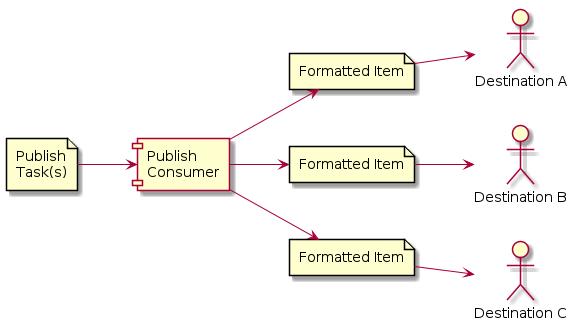
There are currently 3 types of PublishConsumers:
Asyncio Publish Consumer
This PublishConsumer uses Python’s asyncio library to transmit items to their final destination.
Using the asyncio event loop, it allows to transmit multiple items at the same time without using Celery Tasks.
Note
Currently this consumer is not effective, as the PublishTransmitters don’t use asyncio network calls. Until they are converted to use asyncio, only 1 item can effectively be transmitted at once.
- class AsyncioPublishConsumer[source]
Represents an asyncio-based publish consumer that extends the PublishConsumer class.
This class provides functionality for processing and transmitting publishing queue tasks asynchronously. It works in conjunction with specific subscriber resources and queue resources. The implementation focuses on handling the states and transitions associated with the tasks and ensures robust error handling and retries for failed transmissions.
- name: str = 'asyncio'
- async process_tasks(subscriber: SubscribersResource, tasks: list[PublishQueueResource]) None
Processes a list of publishing tasks by attempting to transmit each item asynchronously and logs any errors that occur.
- Parameters:
subscriber – Represents the subscriber resource.
tasks – A list of publishing queue resources to be processed.
- async transmit_item(task: PublishQueueResource) bool
Handles the transmission of an item from the publish queue.
This method manages the state transitions for the item being processed, including updating the state of the publish queue resource, selecting the appropriate transmitter for the item’s destination delivery type, and handling success or failure scenarios during transmission.
If the transmission is successful, the task’s state is updated, and processing is completed. In case of failures, it attempts to handle retries based on the configured maximum retry attempts and delay. Errors encountered during the process are logged, and the task state is updated appropriately. The method ensures that unrecoverable errors halt further processing to avoid prolonged blocking of resources.
- Parameters:
task – The publish queue resource to be transmitted. Contains information such as state, destination, item details, retry attempts, and more.
- Returns:
A boolean indicating whether the transmission was successful.
- Raises:
Exception – If unrecoverable errors occur during the transmission process or while updating the task state. Such errors are raised to halt further processing.
Celery Publish Consumer
This PublishConsumer uses Celery workers to transmit items to their final destination.
Internally it creates a Celery task for each destination, which then uses the AsyncioPublishConsumer to transmit them.
This consumer works much in the same way as the old transmit code (before the async project).
- class CeleryPublishConsumer[source]
Handles the consumption and processing of tasks using Celery in an asyncio-based publishing consumer.
This class is responsible for coordinating and ensuring the transmission of tasks utilizing Celery’s asynchronous task queue system. It ensures no concurrent task execution for the same subscriber while managing the process lifecycle, including locking and unlocking resources.
- Attributes:
Inherits all attributes from AsyncioPublishConsumer.
- name: str = 'celery'
- async process_tasks(subscriber: SubscribersResource, tasks: list[PublishQueueResource]) None
An asynchronous method to process and transmit tasks for a given subscriber.
This method processes the provided tasks by acquiring a lock to ensure that multiple tasks for the same subscriber do not overlap. For each task, it schedules its execution in a high-priority Celery queue based on the task’s priority. After processing, the lock is released.
- Parameters:
subscriber – The subscriber resource for which the tasks are being processed.
tasks – A list of tasks to be processed and transmitted.
Content API Consumer
This PublishConsumer is specifically for publishing an item to the Content API. It calls internal code to add the item into the Content API database directly.
Content Transmitters
Available core transmitters:
- class HTTPPushService[source]
HTTP Publish Service.
The HTTP push service publishes items to the resource service via
POSTrequest. For media items it first publishes the media files to the assets service.For text items the publish sequence is like this:
POSTto resource service the text item
For media items the publish sequence is like this:
Publish media files: for each file from renditions perform the following steps:
Verify if the rendition media file exists in the assets service (
GET assets/{media_id})If not, upload the rendition media file to the assets service via
POSTrequest
Publish the item
For package items with embedded items config on there is only one publish request to the resource service.
For package items without embedded items the publish sequence is like this:
Publish package items
Publish the package item
Publishing assets
The
POSTrequest to the assetsURLhas themultipart/form-datacontent type and should contain the following fields:media_idURI string identifying the rendition.
mediabase64encoded file content. See Eve documentation.mime_typemime type, eg.
image/jpeg.filemetametadata extracted from binary. Differs based on binary type, eg. could be exif for pictures.
The response status code is checked - on success it should be
201 Created. If secret_token is set for destination the x-superdesk-signature header will be added for both json and multipart POST requests.
- class FTPPublishService[source]
FTP Publish Service.
It creates files on configured FTP server.
- Parameters:
username (string) – auth username
password (string) – auth password
path – server path
passive – use passive mode (on by default)
- class FilePublishService[source]
Superdesk file transmitter.
It creates files on superdesk server in configured folder.
- class EmailPublishService[source]
Email Transmitter
Works only with email formatter.
- Parameters:
recipients – email addresses separated by
;
- class ODBCPublishService[source]
Superdesk ODBC transmitter.
Calls a stored procedure with item data.
- Parameters:
connection_string (string)
stored_procedure (string)
Resource Models
Subscriber Models
- class SubscribersResource[source]
- name: AsyncValidator object at 0x750cca8bbdc0>]
- subscriber_type: SubscriberType
- email: _validate_email)]
- media_type: str | None
- sequence_num_settings: SubscriberSequenceSettings | None
- is_active: bool
- is_targetable: bool
- critical_errors: dict[str, bool] | None
- last_closed: SubscriberLastClosed | None
- destinations: list[SubscriberDestination] | None
- products: AsyncValidator object at 0x750cca8b99c0>]
- codes: str | None
- global_filters: dict[str, bool] | None
- content_api_token: str | None
- api_products: AsyncValidator object at 0x750cca8b9060>]
- is_async: Annotated[bool | None, FieldInfo(annotation=NoneType, required=True, alias='async', alias_priority=2)]
- priority: bool | None
- init_version: int | None
- is_digital() bool
- classmethod filter_digital(subscribers: list[Self]) list[Self]
- classmethod filter_non_digital(subscribers: list[Self]) list[Self]
- async classmethod get_names(lookup: dict | None = None) list[str]
- async classmethod get_emails(lookup: dict | None = None) list[str]
- class SubscriberDestination[source]
- name: _validate_not_empty)]
- format: str
- delivery_type: str
- preview_endpoint_url: str | None = None
- config: dict | None = None
Product Models
- class ProductsResource[source]
- name: AsyncValidator object at 0x750cca8d4670>]
- description: str | None
- codes: str | None
- content_filter: ProductContentFilter | None
- geo_restrictions: str | None
- product_type: ProductTypes
- init_version: int | None
- async classmethod get_names(lookup: dict) list[str]
- class ProductContentFilter[source]
- filter_id: AsyncValidator object at 0x750cca8d6740>] = None
- filter_type: ProductFilterType = 'blocking'
Content Filter Models
- class ContentFiltersResource[source]
- name: AsyncValidator object at 0x750cca912890>]
- content_filter: list[ContentFilter] | None
- is_global: bool
- is_archived_filter: bool
- api_block: bool
- class ContentFilter[source]
- expression: ContentFilterExpression
Filter Condition Models
- class FilterConditionsResource[source]
- name: AsyncValidator object at 0x750ccaac7670>]
- field: AsyncValidator object at 0x750ccaac5c90>]
- operator: FilterConditionOperator
- value: str
- class FilterConditionFieldParam[source]
- field: str
- operators: list[FilterConditionOperator]
- label: str | None = None
- values: list[str] | list[dict] | None = None
- value_field: str | None = None
- class FilterConditionOperator[source]
An enumeration.
- IN = 'in'
- NOT_IN = 'nin'
- LIKE = 'like'
- NOT_LIKE = 'notlike'
- STARTS_WITH = 'startswith'
- ENDS_WITH = 'endswith'
- MATCH = 'match'
- EQUALS = 'eq'
- NOT_EQUALS = 'ne'
- LESS_THAN = 'lt'
- LESS_THAN_OR_EQUAL = 'lte'
- GREATER_THAN = 'gt'
- GREATER_THAN_OR_EQUAL = 'gte'
- EXISTS = 'exists'