Signals / Event System
The signal mechanism provides a way to subscribe to events that can be raised by the system.
Signals are strictly typed,
Types Of Signals
At the core is the Signal class, which provides the base functionality for all signal types.
There are also AsyncSignal and SignalGroup types, each with their own use cases.
Example definition and subscription of signals:
from superdesk.core.signals import (
    Signal,
    AsyncSignal,
    SignalGroup
)

# Signal defined on a module level scope
on_start = Signal[]("on_app_start")

class MyClass(SignalGroup):
    # Signals defined on a class instance scope
    on_event: Signal[bool]
    on_event_async: AsyncSignal[str]

# Define some callbacks
def event_cb(arg1: bool):
    print(f"Value: {arg1}")

async def event_cb_async(arg1: str):
    print(f"Value: {arg1}")

async def main():
    # Example connecting, disconnecting and sending signals
    my_inst = MyClass()
    my_inst.on_event.connect(event_cb)
    my_inst.on_event_async.connect(event_cb_async)
    on_start.send()
    my_inst.on_event.send(True)
    await my_inst.on_event_async.send("Some Data")
Signal
Example signals:
# Creating a module level signal
on_create: Signal[dict]

# Creating a class instance scoped signal
class MyContext(SignalGroup):
    on_exit: Signal[bool]
There are two functions for subscribing to a signal:
connect()- connect a function to this signaldisconnect()- disconnect a function from this signal
When you send() a signal, it runs all it’s connected functions with the provided args.
Example:
def on_create_cb(arg1: dict):
    pass

def on_exit_cb(arg1: bool):
    pass

def main():
    my_inst = MyContext()
    my_inst.on_exit.connect(on_exit_cb)

    on_create.connect(on_create_cb)
    on_create.send({"some": "data"})
    on_create.disconnect(on_create_cb)

    my_inst.on_exit.send(True)
- class Signal(name: str, listeners: Iterable[Callable[[Unpack[SignalFunctionSignature]], Awaitable[None] | None] | Callable[[Unpack[SignalFunctionSignature]], None]] | None = None)[source]
A synchronous signal
- connect(callback: Callable[[Unpack[SignalFunctionSignature]], Awaitable[None] | None]) None
Connect a function to this signal, to be called when fired
You can also use the inline add operator to connect to a signal. Example:
signal.connect(cb)
# is the same as
signal += cb
- Parameters:
callback – function to register with this signal
- disconnect(callback: Callable[[Unpack[SignalFunctionSignature]], Awaitable[None] | None]) None
Remove a function from this signal
You can also use the inline subtract operator to remove a callback from a signal. Example:
signal.disconnect(cb)
# is the same as
signal -= cb
- Parameters:
callback – function to remove from this signal
- send(*args: Unpack[SignalFunctionSignature]) None
Call all the registered callbacks connected to this signal
You can also use the call operator to call registered callbacks. Example:
signal.send(args)
# is the same as
signal(args)
- Parameters:
args – The arguments to send to each registered function
Async Signals
Example signals:
from superdesk.core.signals import AsyncSignal, SignalGroup

# Creating a module level signal
on_create: AsyncSignal[dict]

# Creating a class instance scoped signal
class MyContext(SignalGroup):
    on_exit: AsyncSignal[bool]
- class AsyncSignal(name: str, listeners: Iterable[Callable[[Unpack[SignalFunctionSignature]], Awaitable[None] | None] | Callable[[Unpack[SignalFunctionSignature]], None]] | None = None)[source]
An asynchronous signal
- async send(*args: Unpack[SignalFunctionSignature]) None
Call all the registered callbacks connected to this signal
You can also use the call operator to call registered callbacks. Example:
signal.send(args)
# is the same as
signal(args)
- Parameters:
args – The arguments to send to each registered function
Signal Groups
As can be seen from the examples above, a SignalGroup is one way to easily scope signals to a class instance.
Any attribute on the class that starts with on_ and has no value after __init__, then a Signal, AsyncSignal or SignalGroup will be constructed for you.
This allows us to define the signals on the class without constructing them but by annotating them.
AsyncGroups can also be connected to another AsyncGroup:
from superdesk.core.signals import Signal, SignalGroup

class GroupA(SignalGroup):
    on_a1: Signal[bool]
    on_a2: Signal[str]

class GroupB(SignalGroup):
    on_a: SignalGroup[GroupA])
- class SignalGroup[source]
A mixin for supporting class signal attributes
Fields that start with on_ and have no value, will be auto-initialised
- Util methods to:
get instance attributes that are Signal, AsyncSignal, or SignalGroup
clear all listeners
connect another group to common signals in this group
- signal_name_prefix: ClassVar[str] = ''
Optional prefix string used when auto-initialising class signal attributes
- get_all_signals() list[tuple[str, Signal | AsyncSignal]]
Get all attributes of this class that are a
SignalorAsyncSignalinstance
- get_all_groups() list[tuple[str, Self]]
Get all attributes of this class that are an instance of
SignalGroup
- clear_listeners() None
Clear all listeners for all group and signal attributes of this class
- connect_group(group: Self)
Connect another group to common signals in this group
Resource Signals
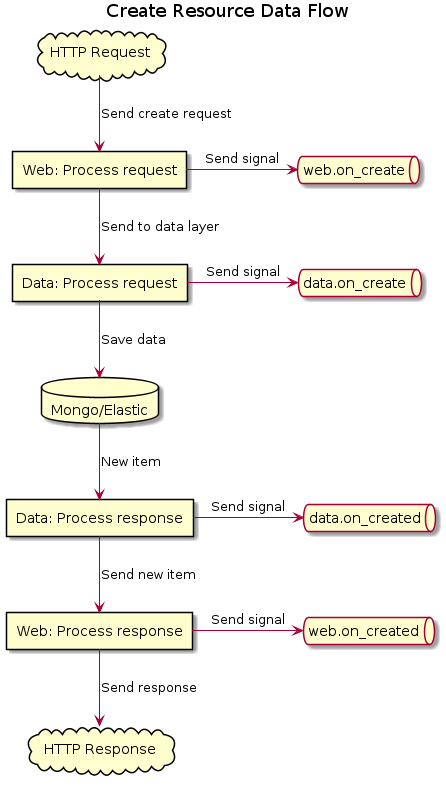
Resource signals are split up based on context, data or web.
Below is a short diagram showing when the resource signals are fired. This example is when the API receives a request to create a new resource.
- class ResourceSignals(connect_to_global: bool = True)[source]
A group of resource signals, combining both data and web api signals
- clear_listeners() None
Clear all listeners for all group and signal attributes of this class
- connect_to_global: bool
Flag to indicate if this resource should connect to global resource signal, defaults to
True
- data: ResourceDataSignals[ResourceModelType]
Data signals sent when interacting with the DB
- web: ResourceWebSignals[ResourceModelType]
Web signals sent when receiving REST request through API
Data Signals
The ResourceDataSignals class is used for signals around sending data to the DB. Signals are sent before and after the following DB actions:
Example:
from tests.core.modules.users import User

def on_user_create(user: User) -> None:
    user.code = "test_user_code"

def init_app():
    User.get_signals().data.on_create.connect(on_user_create)
Below are the available resource data signals, along with their types.
- class ResourceDataSignals[source]
A group of signals to be used on a resource data layer
- on_create: AsyncSignal[ResourceModelType]
Signal fired before a resource item is saved to the DB
- Params:
item
ResourceModel: The item to be created
- on_created: AsyncSignal[ResourceModelType]
Signal fired after a resource item has been saved to the DB
item
ResourceModel: The item that was created
- on_update: AsyncSignal[ResourceModelType, dict[str, Any]]
Signal fired before a resource item is updated in the DB
- Params:
original
ResourceModel: The original item that is to be updatedupdates
dict: A dictionary of key/value pairs to update
- on_updated: AsyncSignal[ResourceModelType, dict[str, Any]]
Signal fired after a resource item has been updated in the DB
- Params:
original
ResourceModel: The original item that was updated (without changes applied)updates
dict: A dictionary of key/value that was updated
- on_delete: AsyncSignal[ResourceModelType]
Signal fired before a resource item is to be deleted from the DB
- Params:
item
ResourceModel: The item is to be deleted
- on_deleted: AsyncSignal[ResourceModelType]
Signal fired after a resource item has been deleted from the DB
- Params:
item
ResourceModel: The item that was deleted
Web Signals
The ResourceWebSignals class is used for signals around receiving API requests regarding resources.
Signals are sent before and after the following request actions:
Example:
from superdesk.core.types import Request, Response
from tests.core.modules.users import User

def on_user_create(request: Request, users: list[User]) -> None:
    # Use the request object to apply some logic
    if not request.get_url_arg("add_code"):
        return

    # Update the resource data before it's saved in the DB
    for user in users:
        user.code = "test_user_code"

def on_user_create_response(
    request: Request,
    response: Response
) -> None:
    # Add some headers to the response
    response.headers += (("X-Custom-Attribute", "SomeValidData"))

def init_app():
    # Connect our resource listeners to the resource web signals
    signals = User.get_signals().web
    signals.on_create.connect(on_user_create)
    signals.on_create_response.connect(on_user_create_response)
Below are the available resource web signals, along with their types.
- class ResourceWebSignals[source]
A group of signals to be used on a resource web api layer
- on_create: AsyncSignal[Request, list[dict]]
Signal fired before processing a Web request to create a new resource item
- Params:
request
Request: The Web request instanceitems
list[ResourceModel]: A list of items to be created
- on_create_response: AsyncSignal[Request, Response]
Signal fired before sending Web response from a new resource request
- on_update: AsyncSignal[Request, ResourceModelType, dict[str, Any]]
Signal fired before processing a Web request to update an existing resource item
- Params:
request
Request: The web request instanceoriginal
ResourceModel: The original item that is to be updatedupdates
dict: A dictionary of key/value pairs to update
- on_update_response: AsyncSignal[Request, Response]
Signal fired before sending Web response from an update resource request
- on_delete: AsyncSignal[Request, ResourceModelType]
Signal fired before processing a Web request to delete a resource item
- Params:
request
Request: The web request instanceitem
ResourceModel: The resource item to be deleted
- on_delete_response: AsyncSignal[Request, Response]
Signal fired before sending Web response from a delete resource request
- on_get: AsyncSignal[Request]
Signal fired before processing a Web request to get a resource item
- Params:
request
Request: The web request instance
- on_get_response: AsyncSignal[Request, Response]
Signal fired before sending Web response from a get resource item request
- on_search: AsyncSignal[Request, SearchRequest]
Signal fired before processing a Web request to search for resource items
- Params:
request
Request: The Web request instancesearch
SearchRequest: The search request instance
Global Resource Signals
Global resource signals exist so if you can hook code into signal(s) from all resources.
It is an instance of ResourceSignals.
You use it by importing the module level signal from superdesk.core.resources.global_signals.:
from superdesk.core.resources import (
    ResourceModel,
    global_signals,
)

async def on_resource_created(doc: ResourceModel) -> None:
    print(f"{doc.type} - {doc.id}: created")

global_signals.data.on_create.connect(on_resource_created)
Global Functions
- get_resource_signals(resource_model_class: type[ResourceModelType]) ResourceSignals[ResourceModelType][source]
Get the
ResourceSignalsinstance for the provided resource type
Example Signals
On Resource Registered
Example signal definition and subscription
Originally when registering a resource, the Resources module will be in charge of registering that resource with Mongo & Elastic. This was hard coded:
class Resources:
    ...

    def register(self, config: ResourceConfig):
        ...
        mongo_config = config.mongo or MongoResourceConfig()
        if config.versioning:
            mongo_config.versioning = True

        self.app.mongo.register_resource_config(
            config.name, mongo_config
        )
        ...
With the help of SignalGroups, modules no longer need to add their code to the Resources module,
but instead connect to the on_resource_registered signal and add the registration code there.
from superdesk.core.signals import Signal, SignalGroup

class Resources(SignalGroup):
    on_resource_registered: Signal[
        SuperdeskAsyncApp,
        ResourceConfig
    ]

def register(self, config: ResourceConfig):
        ...
        self.on_resource_registered.send(self.app, config)
        ...
And then in a mongo module:
from superdesk.core.types import MongoResourceConfig
from superdesk.core.app import SuperdeskAsyncApp
from superdesk.core.resources import ResourceConfig

def on_resource_registered(
    app: SuperdeskAsyncApp,
    config: ResourceConfig
) -> None:
    mongo_config = config.mongo or MongoResourceConfig()
    if config.versioning:
        mongo_config.versioning = True

    app.mongo.register_resource_config(config.name, mongo_config)
This way the Resources class does not need to know how to register resources for other modules.